PHP Error Levels
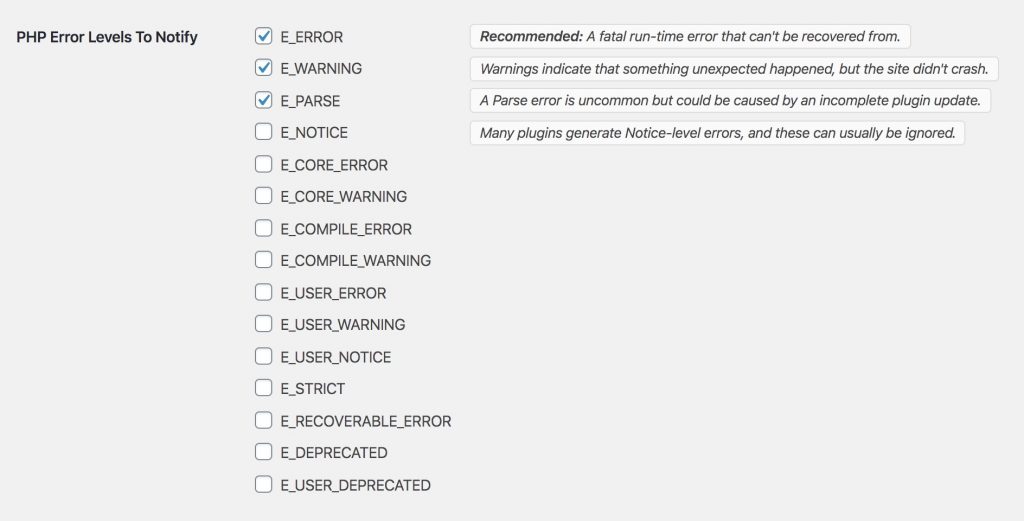
Fatal Error Notify can monitor for different PHP error levels. You can configure which levels trigger notifications from the General Settings tab.
Available Error Levels
E_ERROR— Fatal runtime errors. These are the big ones — they take your site offline. Recommended: always enabled.E_WARNING— Runtime warnings. These don’t stop your site, but can indicate something isn’t working right. Some plugins trigger warnings that don’t necessarily mean there’s a serious problem.E_PARSE— Compile-time parse errors. Usually caused by syntax errors in PHP files.E_NOTICE— Runtime notices. Minor issues that PHP thinks you should know about. These can be noisy.E_DEPRECATED— Code using deprecated PHP features. Useful during upgrades, but can generate a lot of notifications.
For most sites, enabling E_ERROR is the recommended minimum. Add E_WARNING if you want more visibility, but be prepared for more frequent notifications.
Plugin and System Error Types

Beyond PHP errors, Fatal Error Notify can monitor for errors from specific plugins and WordPress subsystems:
- WordPress HTTP — HTTP API errors (timeouts, invalid SSL, too many redirects, etc.)
- JavaScript — Uncaught errors, console errors, console warnings, unhandled promise rejections, and failed resource loads (scripts, styles, images)
- FluentSMTP — Failed email sends
- Gravity Forms — Feed processing errors
- WooCommerce — Emergency, Alert, Critical, Error, and Warning conditions
- WPForms — Error conditions and integration provider errors
- WP Fusion — API errors and log notices
- WP Mail SMTP — Email sending errors

These integrations appear automatically when the corresponding plugin is active on your site.
Per-Channel Configuration
Error levels and plugin error types can be configured independently for each notification channel (Email, Slack, Twilio). This lets you set up different alerting strategies:
- Email: Only fatal errors (
E_ERROR) for a clean inbox - Slack: Warnings and plugin errors for detailed team monitoring
- Twilio SMS: Only
E_ERRORfor critical mobile alerts
Configure these from each channel’s settings section.