What Is Fatal Error Notify?
Fatal Error Notify Pro monitors your WordPress site for PHP errors, and sends you real-time notifications via email, Slack, and/or SMS (Twilio) when something breaks. Instead of finding out about a fatal error from a customer complaint, you’ll know about it the moment it happens.
Installing the Plugin
Pretty straightforward:
- Download the plugin .zip file from your account at fatalerrornotify.com/account
- In your WordPress admin, go to Plugins » Add New » Upload Plugin
- Upload the .zip and click Install Now
- Click Activate Plugin
Basic Configuration
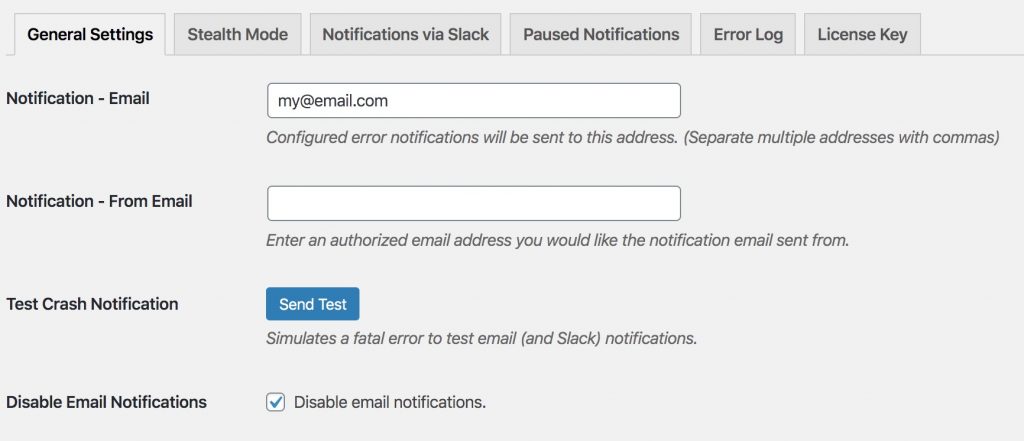
After activation, head to Settings » Fatal Error Notify (or Network Admin » Settings » Fatal Error Notify on multisite).
Notification Email
Enter the email address where you’d like to receive error notifications. You can enter multiple addresses separated by commas.
From Email
This is the “from” address on notification emails. Leave it blank to use your site’s default admin email.
Test Crash Notification
Click the Test Crash Notification button to trigger a test error. This will send a notification through all of your enabled channels (Email, Slack, and/or Twilio) so you can confirm everything is working.
Disable Email
If you’re using Slack or SMS notifications and don’t need email, check the Disable Notifications box under the email settings. The other channels will continue to work normally.
Next Steps
Once your basic email notifications are working, you can:
- Connect Slack for real-time channel notifications with action buttons
- Set up Twilio SMS for text message alerts
- Configure error levels to control what types of errors trigger notifications