Setting Up Twilio SMS
Fatal Error Notify can send SMS notifications via Twilio when errors occur on your site. This is ideal for critical alerts that need immediate attention.
Twilio Account Setup
- Sign up for an account at twilio.com
- From your Twilio console, get your Account SID and Auth Token. For help finding these, see Twilio’s API credentials guide.
- Purchase or set up a phone number in Twilio to send messages from
Plugin Configuration
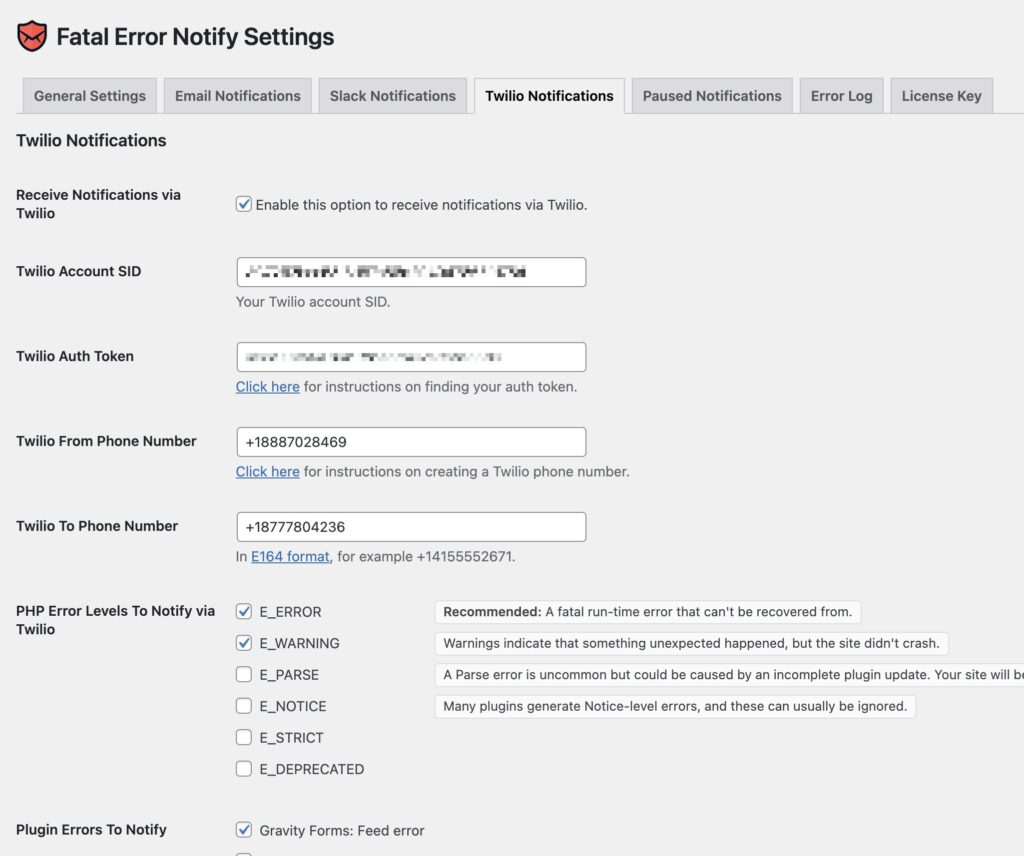
In Settings » Fatal Error Notify » Twilio, enter:
- Account SID: Your Twilio account SID
- Auth Token: Your Twilio auth token
- From Phone Number: The Twilio phone number to send messages from (include country code, e.g.
+15551234567) - To Phone Number: The phone number to receive notifications at
Per-Channel Error Levels
You can configure which error levels trigger SMS notifications separately from email and Slack. Since SMS messages have a character limit and can get expensive at volume, most people configure Twilio to only send for the most critical errors (E_ERROR).
See Error Levels and Types for more on configuring these.